Nebula
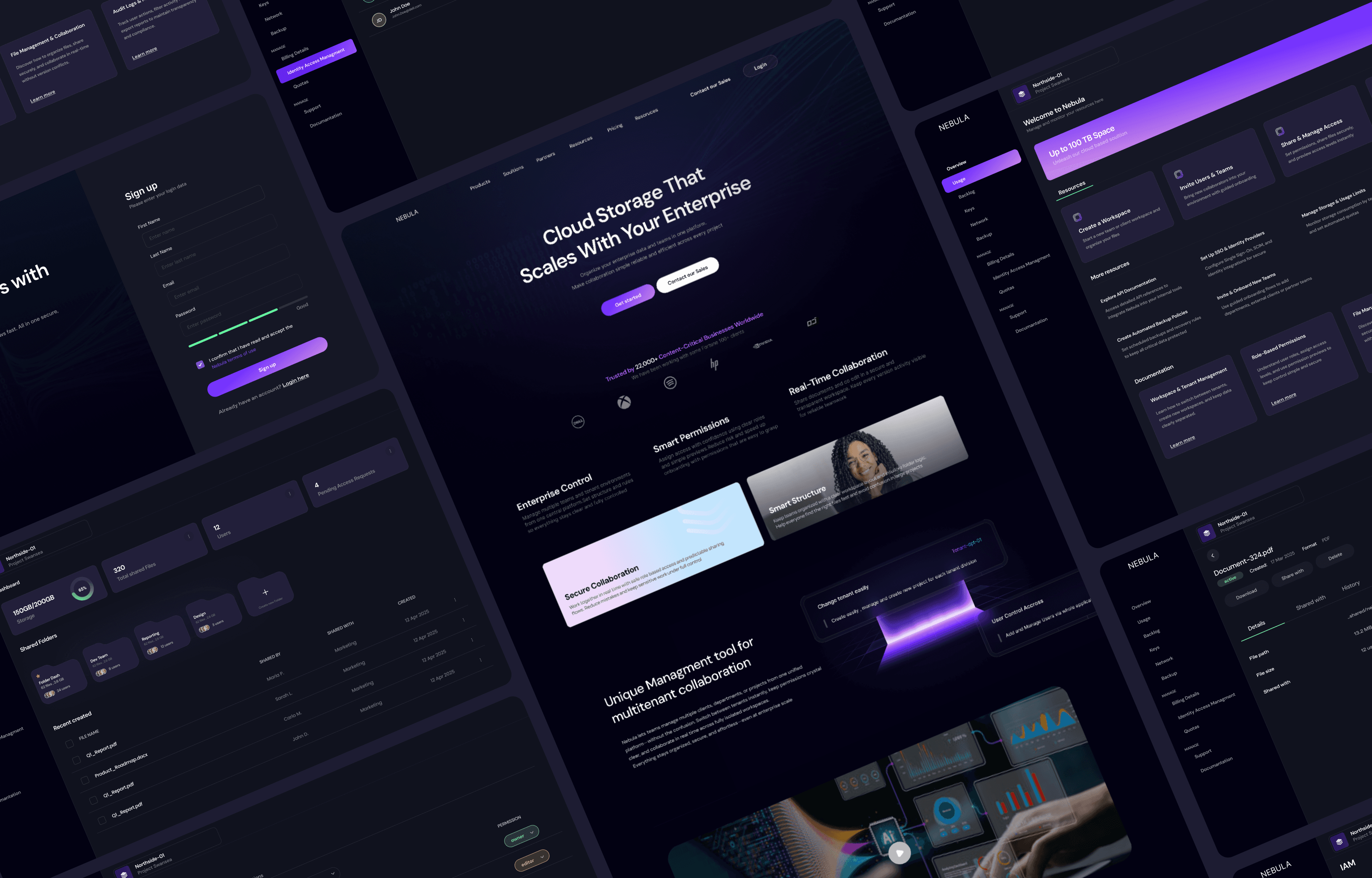
Nebula is a cloud storage platform built specifically for enterprise organizations handling massive datasets. Teams can manage, backup, and share files with real time collaboration and multi-tenant support

88%
Task Success Rate
Users efficiently complete critical enterprise tasks

75%
First-Time Onboarding Success
New users set up workspaces and permissions without support

82
SUS Score
Overall usability for enterprise workflows, measured across all features

My Role
Product Designer
Collaboration
Product Manager, 8 Engineers, QA, Dev Ops Engineer
Year
2025
Duration
16 weeks
Tools
Figma, FigJam, Notion, Miro
Defining the Problem
Why Managing Massive Datasets Is a Headache
for Enterprises?
The Challenge
Enterprise teams deal with huge amounts of data across departments, clients, and external partners. It’s easy to lose track of who has access to what, tenants get mixed up and collaborating in real-time can be slow and confusing. Most cloud storage tools don’t
really solve these problems
Problem Statement
Large enterprise teams need a storage platform that keeps data organized, access clear, and collaboration smooth. Without strong multi-tenant support, clear permission controls and dependable real-time tools, information quickly gets scattered, mistakes happen, and teams lose valuable time.
Solution
Nebula creates separate workspaces for each tenant, keeps role-based permissions clear with previews, and provides centralized audit logs for transparency. Real-time collaboration is optimized for large teams and big files, enabling smooth, secure, and efficient teamwork.

Objectives & Goals
Empowering Enterprises with Seamless and Scalable Cloud Storage

Enable secure file storage and sharing for teams
Protect data across departments and tenants

Simplify team collaboration in
real-time
Editing, commenting, and sharing

Ensure reliable data backup and integrity
Files are always recoverable

Simplify multi-tenant management
Switch between clients and teams effortlessly

Streamline role-based permissions
Admins can easily set access levels for users

Support scalability for large organizations
Handle thousands of users and petabytes of data
Business Overview
Why Nebula Matters for Enterprises?

Business Context
As remote work and digital collaboration become the norm, enterprises need cloud storage that is secure, scalable, and easy to use. Large organizations managing massive datasets face challenges like complex permissions, isolated workspaces, and coordinating real-time collaboration across teams and external clients. Many existing solutions are hard to configure and don’t fully support enterprise-scale workflows. Nebula addresses these gaps, making enterprise storage simple, manageable, and collaborative.

Business Goals
Grow the user base
Grow from 0 to 60 active enterprises within the first year
Reduce churn rate
Keep churn under 10% after 3 months of usage
Increase Average Revenue Per User (ARPU)
Target $30,000 ARPU per enterprise client
/02 Research
DOKS
This template is a great way to showcase your application's documentation in full with code and imagery.
Research objectives
Understanding Enterprise Workflows
01
Discover workflows and pain points for teams handling sensitive or high volume data
02
Explore frustrations and limitations of current enterprise storage platforms used in daily operations
03
Understand which collaboration and permission features are most valuable in a secure, scalable cloud storage tool
04
Compare needs across different roles in enterprise organizations including admins team leads and regular employees

Competitive analysis
To uncover structural gaps in the enterprise storage landscape, I analyzed major platforms (Dropbox Business, Box, OneDrive, Egnyte, Citrix ShareFile, Tresorit). Despite strong baseline functionality, several recurring limitations emerged:
Lack of true multi-tenant architecture for managing multiple clients or departments at scale
Overly simplistic permission models that fail to support complex enterprise hierarchies
Fragmented or shallow audit logs, making compliance and troubleshooting difficult
Performance issues and collaboration friction when handling large datasets
Low contextual clarity, increasing the risk of working in the wrong workspace

User interviews
To understand how enterprise teams navigate multi-tenant workflows, I conducted 12 interviews with IT admins, team leads, and employees. Despite different roles, several consistent patterns emerged:
IT admins struggle with permission clarity, workspace boundaries, and limited visibility into user activity
Team leads face coordination issues, unclear access setups, and unreliable real-time collaboration
Employees often lack visibility into what they can access, leading to wasted time searching and inconsistent workflows
Discovery
What I Discovered - Key Pain Points
Enterprise Admins
Overlapping permissions create confusion and frequent misconfigurations
Onboarding new teams or external partners is slow and error-prone
Little visibility into who did what (no unified audit trail)
Managing storage usage and quotas across tenants is time-consuming
Struggle to manage multiple clients or departments under a single account
Internal Employee
Collaboration on large files is slow and leads to errors
Frequent version conflicts during simultaneous editing
Navigation between shared spaces feels unclear and inconsistent
Tasks get delayed due to unclear organization and permission issues
Unsure which files or folders they can access across different tenants
External Client
Slowdowns caused by permission setups they can’t control
Difficult to leave feedback or share updates confidently
Blurred collaboration boundaries lead to mistakes
Unclear which documents they can view or edit
Research Insights and How They Shaped Design?
Insights

UX Impact
Multi-tenant management
Large enterprise organizations operate across many departments, internal teams and external clients, which creates confusion around workspace boundaries and increases the risk of accidental data exposure
Introduced an intuitive tenant switcher and clearly defined workspace boundaries (visual scope indicators, tenant context header). This reduces accidental cross-tenant actions, speeds up context switching for admins, and makes tenant ownership explicit across the UI.
Granular permissions
Admins find it difficult to assign and audit permissions at folder and file level; overlapping rules and unclear defaults lead to configuration errors
Implemented role-based, fine-grained access controls with clear defaults, inline affordances and a preview mode that shows effective permissions before saving. This reduces misconfiguration, makes permission intent visible, and decreases support overhead
Auditability & transparency
Enterprises require visibility into who did what, when both for compliance and for troubleshooting cross-team collaboration
Built centralized admin dashboards with searchable audit logs, activity timelines, and exportable reports. Admins can quickly trace changes and demonstrate compliance without digging through raw logs
Real-time collaboration
Teams working on large datasets experience slow collaboration and version conflicts; existing tools don’t scale well with large files or many concurrent editors
Optimized real-time collaboration workflows (live cursors, optimistic sync, conflict resolution UI and comments sidebar). This enables simultaneous editing with fewer conflicts and faster perceived performance
Onboarding for complex workflows
Enterprise onboarding includes domain verification, compliance checks and SSO — admins are easily blocked by unclear steps or missing validations
Designed a guided onboarding flow with step indicators, validations, helpful defaults and error remediation tips.
This reduces setup errors and accelerates time-to-first-collaboration for team
Role-based user experience
Different roles (admins, team leads, employees, external clients) have distinct needs and tolerances for complexity; showing everything to everyone creates noise and mistakes
Implemented role-specific UI states (dashboard views, permission panels, and action affordances tailored per role). This lowers cognitive load, surfaces relevant actions and prevents non-admin users from making risky changes
/03 Ideation
DOKS
This template is a great way to showcase your application's documentation in full with code and imagery.
Design Principles derived from Research
How It Works

Problem It Solves
Secure & Scalable
Nebula must handle massive datasets safely and efficiently. Design for reliability, data integrity and compliance at every layer — from upload pipelines to collaboration features
Addresses performance and security concerns identified in interviews and competitive analysis
Intuitive Multi-Tenant Management
Switching between clients, departments or projects should be fast and error-free. Use clear workspace boundaries, persistent tenant context indicators and an accessible tenant switcher
Solves confusion and accidental cross-tenant actions discovered in admin workflows
Granular Permissions
Provide role-based, fine-grained controls with sensible defaults, previews and inline explanations. Make permission outcomes visible before changes are applied
Responds to admin difficulties with folder/file level access and overlapping rules
Effortless Collaboration
Support real-time co-editing, comments and non-disruptive conflict resolution. Design collaboration UIs to scale for large files and many users, with clear version history and restore options
Addresses slow collaboration and version conflicts on large datasets
Seamless Onboarding
Design onboarding as a guided, validated flow: break complex enterprise setup into clear steps (domain verification, SSO, compliance checks), surface progress and provide remediation help
Reduces onboarding friction that blocks adoption
Role-Based UX
Tailor the interface by role: surface advanced controls to admins, simplify task flows for contributors, and provide focused collaboration tools for team leads. Keep information density appropriate to the user’s responsibilities.
Ensures clarity and productivity across diverse enterprise roles
User Personas & Journey

Arjun Patel
Team Lead - Admin
Company
Large enterprise (5000+ employees)
Background
Oversees a department within a large enterprise.
Responsible for team coordination, file access and tenant
level administration. Highly familiar with enterprise IT systems.
Goals
Manage team workflows and tenant-level access efficiently.
Ensure security and compliance within his department.
Assign roles and permissions accurately without errors.
Onboard new teams and external clients smoothly.
Frustrations
Complex and unintuitive permission structures.
Limited visibility into user actions and file activity
Slow onboarding processes for new teams and clients.
Confusion when switching between multiple tenants
Scenario
Sets up his company on Nebula, verifies compliance, configures tenants, assigns roles and quotas, and establishes secure collaboration across internal teams and clients
Phase
Actions
User Goals
Pain Points
Opportunities
Emotions
Discovery
Visits website, reviews pricing, registers with business email and view possibilities
Understand value and ease of setup before committing
Confusion about enterprise features
Clear enterprise-focused landing, CTA for demo, transparent pricing
This looks promising; hope setup isn’t complex 😐
KYB Verification
Fills company info, uploads legal docs, waits for verification
Complete compliance quickly and gain access
Slow verification; anxiety about approval
Progress tracker, sandbox access during verification, notifications
Will this take long? 😣
Payment Setup
Adds billing info, chooses plan, sets corporate card
Finalize setup and unlock platform access
Uncertainty about billing cycles, seat allocation
Streamlined payment UI, clear invoice preview, seat-based pricing
Done once, then I can focus on setup 😕
Tenant Setup
Creates tenants, names workspaces, organizes default settings
Keep client data isolated and organized
Confusing multi-tenant setup, risk of accidental cross-tenant actions
Tenant headers, workspace previews, persistent tenant switcher
Data must stay separate 😬
IAM & Quotas Managment
Invites internal teams & external clients, sets storage quotas, configures alerts
Ensure security and proper access. Maintain control of storage and usage
Complex permission matrix, unclear inheritance
Role based templates, inline preview, conflict alerts, Interactive sliders, visual feedback, alert notifications
One wrong permission could compromise security 😰
Collaboration
Shares folders, edits documents, comments, manages versions
Ensure team collaboration is efficient and reliable
Sync delays on large files, version conflicts
Confusion about enterprise features
I can see exactly who’s doing what 😎
Monitoring, Scaling & Renewal
Review logs, track activity, export compliance reportsAdds new tenants, adjusts plan/seats
Maintain visibility and compliance. Scale organization efficiently
Re-entering billing info
Confusion about enterprise features
I have full visibility and control. Platform grows with us 😃

Anna Miller
Internal Employee
Company
Enterprise, works across multiple departments
Background
Works on data analysis and reporting.
Collaborates with multiple teams on projects.
Limited administrative responsibilities
Goals
Quickly find, edit, and share files relevant to projects.
Collaborate efficiently with internal teams and external clients.
Avoid errors or delays due to unclear permissions or version conflicts.
Frustrations
Unclear which files or folders she can access.
Version conflicts during simultaneous editing.
Slow upload and download for large files.
Difficulty tracking updates made by other team members.
Scenario
Gets invited by her Lead - accesses her team’s workspace, collaborates on shared files and provides feedback efficiently while staying within role-based access boundaries
Phase
Actions
User Goals
Pain Points
Opportunities
Emotions
Onboarding
Receives invitation, creates account, sets password, completes brief onboarding
Register quickly and set up work environment
Confusing registration steps or unclear workspace access
Streamlined invite flow, SSO option, clear instructions, contextual onboarding
I hope registration is simple and I can access my team’s files quickly🙂
File Access
Opens shared folders, navigates workspace
Access all necessary files efficiently
Unclear which files are accessible
Folder ownership badges, access labels, tenant color codes
Can I see everything I need?
😐
Collaboration
Co-edits documents, comments, tracks changes
Work efficiently with team members
Version conflicts, slow loading
Live cursors, real-time sync, conflict resolution UI, inline comment threads
I don’t want to overwrite anyone’s work
😕
Sharing
Shares files internally and externally
Share files securely without errors
Lack of visibility into permissions
Contextual sharing dialogs
Did I share this with the right people?
😬
Notifications
Receives alerts on edits/comments
Stay updated without overload
Overwhelming notifications
Aggregated activity summary, customizable notification settings
I need to stay informed but not spammed
😐
Feedback & Review
Adds comments, approves versions
Provide timely feedback
Delays in visibility of comments
Real-time updates, threaded comments, email integration
Hope the team sees my feedback quickly
😎
End-of-Day Wrap-Up
Syncs local changes, checks pending tasks
Ensure work is saved and synced
Sync failures, accidental overwrites
Background sync, optimistic UI, version history restore
All tasks done for today, everything is synced.
😌

Michael Smith
External Client
Company
Partner organization
Background
Works with enterprise teams on joint projects.
Needs secure access only to relevant data. Not part of internal company systems.
Goals
Access only relevant projects and files securely.
Share updates and feedback easily with internal teams.
Collaborate efficiently without unnecessary steps.
Frustrations
Confusion over what files or folders he is allowed to access.
Complicated sharing workflows in current systems.
Delays in receiving updates or feedback from internal teams.
Lack of clarity on versioning and recent changes.
Scenario
Receives invitation to a shared Nebula workspace, reviews project deliverables, provides feedback and approvals and exchanges files with internal team members
Phase
Actions
User Goals
Pain Points
Opportunities
Emotions
Invite & Access
Receives invitation, creates account, sets password
Access the platform with minimal friction
Confusing invite links, password rules
Single Sign-On option, clear onboarding email
Do I need to remember another login?
😐
Onboarding
Guided walkthrough of shared workspace
Understand workspace layout
No context on workspace hierarchy
Visual cues, color-coded folders, tenant labels
How do I see my files and folders?
😕
File Viewing
Opens shared documents
Access project deliverables easily
Permission errors, missing access
Inline access checks, “request access” button
I just want to see my deliverables
🙂
Feedback
Adds comments, marks approvals
Provide clear feedback quickly
Confusion about comment visibility and versioning
Real-time comment sync, threaded replies, notifications to sender
I hope my feedback reaches the team immediately
😬
Notifications
Receives activity alerts
Stay informed of changes
Overwhelming alerts
Aggregated notifications, digest view
I don’t want too many emails
😐
Collaboration /Reporting
Edits lightweight documents, fills forms. Downloads approved files, tracks progress
Collaborate efficiently. Track deliverables and project status
Slow loading for large files. Hard to extract version history
Optimized viewer for large documents, inline edits
I need to show progress internally
🙂
End-of-Day Wrap-Up
Confirms tasks complete, logs out
Ensure all feedback is delivered
Minor friction
Automatic sync, summary of actions, activity dashboard
Everything synced, feedback sent
😌
/04 Visual Identity
DM Sans
aA bB cC dD eE fF gG hH iI jJ kK lL mM nN oO pP qQ rR sS tT uU vV wW xX yY zZ
0 1 2 3 4 5 6 7 8 9
Light
Regular
Medium
Semi Bold
Bold
Blue Violet
Heliotrope
Aquamarine
Cute Sky Blue
Cute Violet
Cool Black
Midnight Black
/05 Impact
Key UX Metrics
Why it matters
Measured by
88% Task Success Rate
Reduces errors in multi-tenant enterprise workflows and ensures secure, accurate file and permission management
6 usability tests across admins, team leads, and employees performing critical tasks.
Granular role-based permissions, workspace previews, inline previews, and conflict alerts
80% First-Time Onboarding Success
Ensures new teams and external partners can start using the platform without support
Observing first-time setup of tenants, workspaces, and permissions.
Guided onboarding flow with step indicators, inline validations, helpful defaults, and error remediation tips
System Usability Scale (SUS) Score: 82/100
Confirms overall platform intuitiveness and ease of use for enterprise users
Aggregated SUS scores from usability testing sessions across all roles.
Role-specific UI states, clear navigation, and consistent visual indicators.
Multi-Tenant Efficiency
Prevents accidental cross-tenant actions and keeps workspaces organized
Persistent tenant switcher, workspace headers, color-coded tenants, and contextual indicators
98% of admins can switch between tenants without errors on first attempt
Impact
Business / Product value
Fast Onboarding Multi-tenant management and guided setup allow enterprise teams to onboard quickly without support
Efficient Workflows Granular permissions and optimized real-time collaboration help teams work more efficiently
High Task Success Metrics show users complete tasks with fewer errors and higher confidence
Reduced Support Requests Clear role-based UX and intuitive workflows minimize mistakes and reduce the need for support
Scalable Platform Designed to handle thousands of users and petabytes of data, supporting enterprise growth
Role-Based UX Ensures features are surfaced to the right users, lowering cognitive load and preventing accidental actions
/06 Conclusion

Takeaways
Nebula successfully addresses complex enterprise challenges, including multi-tenant management, granular permissions, and real-time collaboration. The platform enables teams to onboard quickly, work efficiently, and scale securely. Metrics demonstrate high task success, fast onboarding, and intuitive workflows, reducing errors and support requests while boosting productivity and user confidence. This project highlights the importance of role-based UX and scalable design for enterprise-level products
Your product deserves better. Let’s build it right.
slavencovic
2025©All rights reserved.
Phone